


The RC-FS20 Dispatch Software unifies multiple radio systems into a single IP-based dispatch solution. Running on a standard Windows™ PC, it provides seamless voice access to IDAS™ digital radios (NXDN™/dPMR™) and Wi-Fi radios through one intuitive interface.
With the VE-PG4 RoIP Gateway, the RC-FS20 connects analog systems, LTE networks, and other radios into a coordinated operation. Optional activation keys enable advanced features such as AVL tracking (available later) and encryption, so you choose the features you need.
One Console for All Your Radios
The RC-FS20 seamlessly integrates IDAS™ digital radios and Wi-Fi radio systems into a single platform, eliminating the need to operate separate consoles and keeping your entire team connected. With the VE-PG4 RoIP Gateway, you can extend connectivity beyond IDAS™ to virtually any communication system—including P25, LTE radios, marine VHF, aviation, satellite PTT, analog radios, and IP phones—giving your operators a unified view across every system in the field.

Communication & System Management
The RC-FS20 provides flexible communication and system management tools to keep your operation running smoothly.
- Up to 32 configurable radio systems (IDAS™: NXDN™ conventional/trunking, dPMR™ mode 2, Wi-Fi radio, and RoIP)
- All call, group call and individual call functions
- Independent audio volume control per site for focused monitoring
- Online check function to identify active units and their status
- Text messaging to IDAS™ and Wi-Fi radios
- Three user permission levels: Super User, Power User, and User
- Customizable contact cards (size, colors and background image)
- Call history, system log and repeater status monitoring
- SDK (Software Development Kit) available separately for custom feature development
Never Miss an Emergency Activation

A dedicated alert window automatically appears on the dispatcher's screen, enabling a prompt response when personnel safety is at stake.
Integrated AVL with GNSS Mapping*

The RC-FS20 displays real-time location data from IDAS™ and LTE radios on an intuitive map interface, giving dispatchers the situational awareness they need to coordinate field operations efficiently.
Available later.
Full Visibility into System and Repeater Status

The RC-FS20 brings together status information from all sites into a single, consolidated view. The System Log displays initialization and operational status across every site, while the Repeater Status screen shows technical parameters — including voltage, temperature, PLL lock status, and fan condition — at a glance.
Emergency Response & Security
- Remote monitor function (forced transmit)
- Digital voice scrambler for IDAS™ radios
- AES/DES encryption for IDAS™ conventional radios (activation key required)
- Radio control commands (STUN/KILL/REVIVE) to prevent unauthorized use
- Priority call for Wi-Fi radios (interrupt ongoing calls)
Wi-Fi Location Display & Area Calling

- User locations displayed on facility map (Wi-Fi radios)
- Wi-Fi Area Calling calls users near a selected access point
Flexible Licensing — Choose What You Need

To use RC-FS20, download the base software and activate it with a license key. The ISL-AK20IDS is an activation key for IDAS™/RoIP, replacing the previous RC-FS10. The ISL-AK20WLN is an activation key for Wi-Fi radios, replacing the previous IP100FS. A 30-day Trial key is also available.
| ISL-AK20IDS | IDAS™/RoIP Activation Key |
|---|---|
| ISL-AK20WLN | Wi-Fi Radio Activation Key |
| ISL-AK20AES | AES Encryption Key (for IDAS™ conventional mode) |
| ISL-AK20DES | DES Encryption Key (for IDAS™ conventional mode) |
| ISL-AK20AVL* | AVL Activation Key (for IDAS™ and LTE radio) |
AVL function available later.
Security Dispatch — AVL Function* for Fast Response
When an alert or emergency notification is received from a client site, the RC-FS20 instantly displays the information on the dispatcher’s screen. Real-time AVL tracking* shows the current location and availability of all security staff, enabling quick identification and dispatch of the nearest responder. From confirming the situation with the client to directing field staff, all operations are seamlessly managed from a single console.
AVL function available later.

Correctional Facility — From Daily Operations to Emergency Coordination
The RC-FS20 centralizes all communications among facility staff into a single console. In the event of an emergency, the VE-PG4 RoIP Gateway enables immediate coordination with external agencies such as police and fire departments. A single platform supports both efficient daily operations and rapid response when it matters most.

Medical Center + EMS — Integrates Outdoor and Indoor Communication Systems
Hospital staff using Wi-Fi radios inside the facility and paramedics using IDAS™ radios outside can be called and coordinated from a single RC-FS20 console, ensuring smooth information sharing during emergency response.

Command Vehicle — Unified Communications at the Incident Scene
By deploying the RC-FS20 in a command vehicle, incident commanders can gather information and coordinate all communications on-site during large-scale disasters or wide-area emergencies. The RC-FS20 brings together multiple communication technologies — including P25, IDAS , LTE, and Satellite PTT radios — into a single console, keeping teams connected.

SYSTEM REQUIREMENTS
| Operating System | Windows™ 11, Windows Server™ 2022, Windows Server™ 2025 |
|---|---|
| CPU | 3.0 GHz or faster processor with 8 or more cores* * Intel® or AMD 64-bit processor (Arm® processors not supported) |
| Memory | 16 GB or more |
| Storage | 256 GB or more of available disk space |
| Display | 1920 × 1080 pixels or higher resolution |
| Network | 1 Gbps or faster wired connection |
| Audio | DirectSound compatible sound card, maximum 20 kHz frequency response, 48 kHz sampling rate |
| Other | USB 2.0 port for CT-24 connection, speaker, microphone |


MICROPHONES


AC ADAPTERS


EXTERNAL DEVICES


Catalogs / Brochures
| Brochures Name | Size |
|---|---|
| Business Radio Solutions (USA Edition) | 7.52MB |
| Business Radio Solutions (European Edition) | 7.89MB |
| RC-FS20 | 1.63MB |
Instruction Manual / Guides
| Name | Model Name | Note |
|---|---|---|
| INSTALLATION GUIDE | RC-FS20 | |
| OPERATING GUIDE | RC-FS20 |
 CloseClose
Ingress Protection (IP) Code
Ingress Protection (IP) ratings define the level of protection provided by enclosures to prevent the ingress of foreign objects (dust) and liquid into the electrical equipment.
International Standard IEC 60529 outlines an international classification system that describes the sealing characteristics of electrical equipment.
The classification system uses the “IP” code, or “Ingress Protection” code, to define the level of seal.
An IP number contains two numbers (i.e. IP67) in most instances which relate to the level of protection provided by an enclosure or housing.
Either number may be shown as “X” (i.e. IPX6 / IP7X) to indicate the “X” part is not tested.

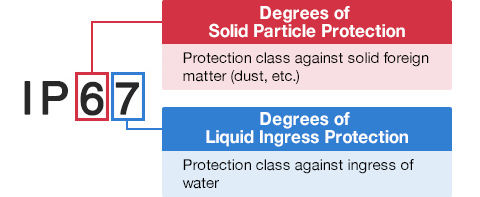
Degrees of Solid Particle Protection – 1st Digit
| IP6x | No ingress of dust; complete protection against contact. (Dust tight) |
|---|---|
| IP5x | Protected from the amount of dust that would interfere with normal operation. (Dust protected) |
Degrees of Liquid Ingress Protection – 2nd Digit
| IPx8 | Protected against continuous immersion in water. Depth and duration specified by model. |
|---|---|
| IPx7 | Protected against temporary immersion in water for 1 m (3.3 ft) for 30 minutes |
| IPx6 | Protected against water projected by powerful jets from any direction. 100 L per minute by a powerful jets (12.5 mm) for 3 minutes. |
| IPx5 | Protected against water projected by jets from any direction. 12.5 L per minute by a nozzle (6.3 mm) for 3 minutes. |
| IPx4 | Protected against water splashed against the equipment from any direction |
