

Descriptions
Refined Style That Matches Your High-End Transceiver
The SM-J1 represents the pinnacle of ICOM's microphone lineup. Its refined design perfectly complements top-tier models such as the IC-7760, creating a unified aesthetic in your shack that elevates your overall operating experience.
Dual Dynamic Microphone Elements Deliver Superior Audio Quality

Excellent frequency response ensures clear, rich audio with the signature dynamic microphone sound. Even in close-mic use, breath noise and plosives remain well controlled. Dual dynamic elements provide superior durability against shock, vibration, and environmental changes.
Directional Pattern Switch for Versatile Operating Environments
Unidirectional mode captures front-facing audio while reducing off-axis background noise—ideal for shared spaces or outdoor operation. When using this mode, bass frequencies increase as you move closer to the mic, which may affect intelligibility in SSB operation.
Omnidirectional mode maintains a consistent frequency response at any mic distance, ensuring natural audio quality and clear intelligibility. Perfect for rag chewing in quiet spaces. Moving closer to the mic also increases talk power for DX contacts and pileups.
Compatible with 5/8-Inch Thread Boom Arms

The microphone detaches easily from the stand and can be mounted on boom arms*, freeing up desk space for other equipment. Using a boom arm also reduces the transmission of desk vibrations to the microphone.
User supplied.
Footswitch Connector for Hands-Free PTT Operation
Connect a commercially available footswitch to enable foot-operated PTT control. Free your hands from the radio and keyboard—ideal for contests where you can concentrate on Search and Pounce and logging for more efficient operating.
Other Features

Manufacturer Select Switch
- ・A Manufacturer Select Switch to use with a transceiver from Icom, Alinco, or JVC KENWOOD
- ・The [F1]–[F4] keys can be used as an external keypad by configuring settings on the transceiver
- ・LOW-CUT switch to remove low-frequency components from the input audio
- ・PTT LOCK switch to fix/release transmit state
- ・Adjustment screwdriver (supplied) for fine-tuning the microphone output level
- ・USB Type-C™ port for use as a PC microphone*
Requires a user-supplied USB Type-C™ cable. When connected to a PC with a USB cable, the microphone switches and keys are not activated.
Microphone Frequency Response
Unidirectional

Omnidirectional

Connections

Specifications
| Microphone element | Dynamic, unidirectional and omnidirectional | |
|---|---|---|
| Output impedance | 600 Ω | |
| Microphone gain (VR max.) | –30 dB ±4 dB | |
| Power requirements | 5 V ~ 8 V DC (supplied from the transceiver) 5 V DC (supplied from the USB) |
|
| Cable length (approximate) | XLR cable | 0.3 m, 0.9 ft (microphone to microphone stand) |
| 8-pin metal cable | 1 m, 3.2 ft (microphone stand to radio) | |
| Weight (approximate) | 1 kg, 2.2 lb | |
All stated specifications are subject to change without notice or obligation.
Supplied Accessories
- ・XLR cable (approximately 0.3 m/0.9 ft long)
・8-pin metal cable (approximately 1 m/3.2 ft long)
・Cap for installing on the microphone stand
・Screwdriver for microphone gain adjustment
HF Radios

All Mode


Catalogs / Brochures
| Brochures Name | Size |
|---|---|
| HAM Radios and Receivers (European Edition) | 2.99MB |
| OPTION LIST - HAM Radios and Receivers | 4.66MB |
| HAM Radios and Receivers | 2.98MB |
| OPTION LIST - HAM Radios and Receivers (European Edition) | 5.44MB |
| SM-J1 (LT) | 379KB |
| SM-J1 (A4) | 389KB |
Instruction Manual / Guides
| Name | Model Name | Note |
|---|---|---|
| Instructions | SM-J1 |
 CloseClose
Ingress Protection (IP) Code
Ingress Protection (IP) ratings define the level of protection provided by enclosures to prevent the ingress of foreign objects (dust) and liquid into the electrical equipment.
International Standard IEC 60529 outlines an international classification system that describes the sealing characteristics of electrical equipment.
The classification system uses the “IP” code, or “Ingress Protection” code, to define the level of seal.
An IP number contains two numbers (i.e. IP67) in most instances which relate to the level of protection provided by an enclosure or housing.
Either number may be shown as “X” (i.e. IPX6 / IP7X) to indicate the “X” part is not tested.

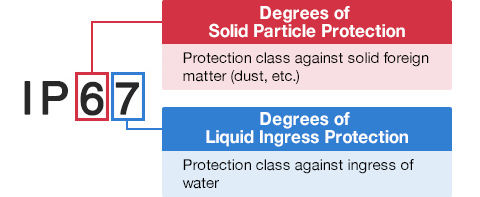
Degrees of Solid Particle Protection – 1st Digit
| IP6x | No ingress of dust; complete protection against contact. (Dust tight) |
|---|---|
| IP5x | Protected from the amount of dust that would interfere with normal operation. (Dust protected) |
Degrees of Liquid Ingress Protection – 2nd Digit
| IPx8 | Protected against continuous immersion in water. Depth and duration specified by model. |
|---|---|
| IPx7 | Protected against temporary immersion in water for 1 m (3.3 ft) for 30 minutes |
| IPx6 | Protected against water projected by powerful jets from any direction. 100 L per minute by a powerful jets (12.5 mm) for 3 minutes. |
| IPx5 | Protected against water projected by jets from any direction. 12.5 L per minute by a nozzle (6.3 mm) for 3 minutes. |
| IPx4 | Protected against water splashed against the equipment from any direction |